Checked on 30 October 2026. Every figure below links to its source at the end of the post.
Black Friday 2026 is on Friday 27 November, and Cyber Monday is on 30 November. That leaves about four weeks. The short answer: order stock now, make the store fast on a phone, pick one simple offer that protects your margin, get your products ready for AI shopping tools, test every discount on a phone two weeks out, then stop changing things from 20 November. The 13 steps below show how, using features already in your Shopify admin.
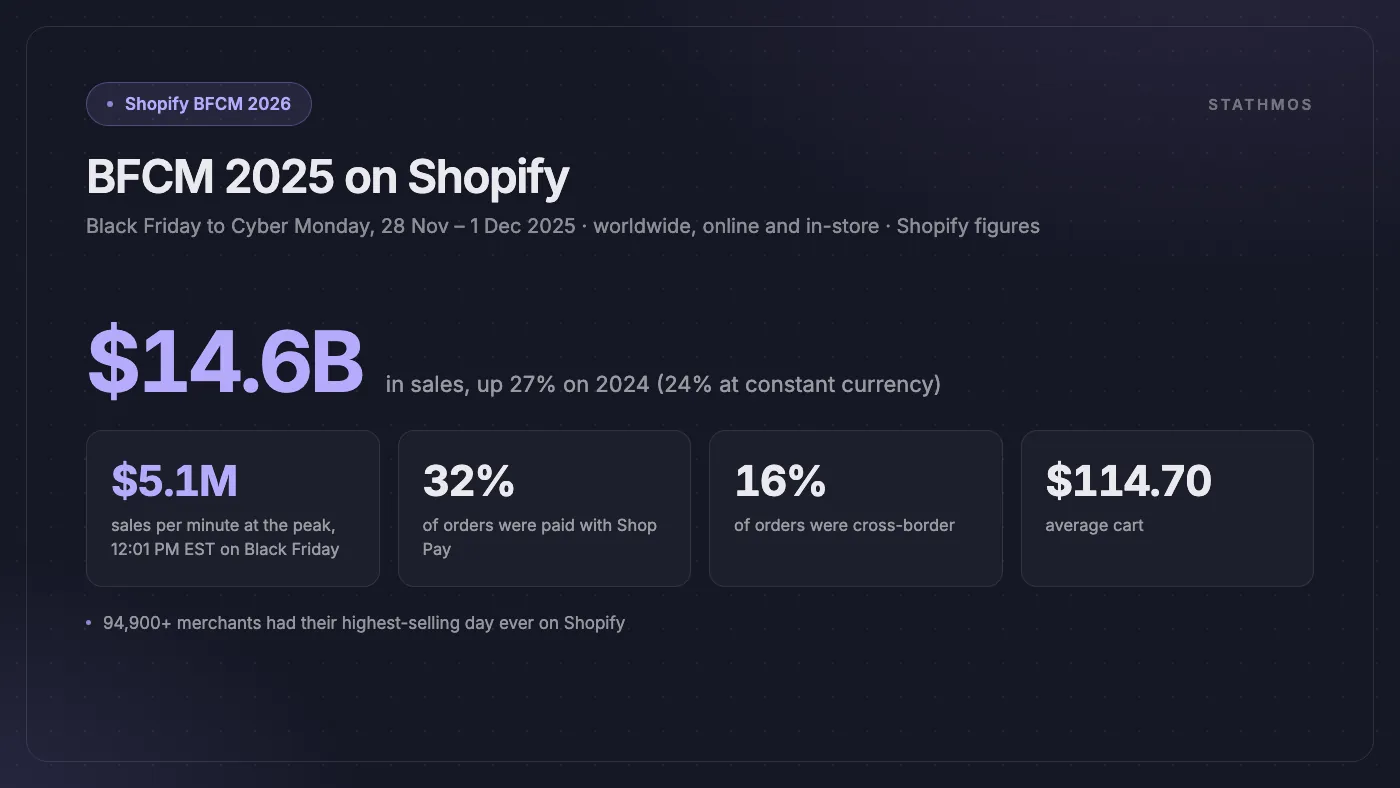
The prize is big. Over Black Friday to Cyber Monday 2025, Shopify merchants sold $14.6 billion, up 27% on 2024 (24% at constant currency). Sales peaked at $5.1 million per minute at 12:01 PM EST on Black Friday, and more than 94,900 merchants had their highest-selling day ever on Shopify.
What Is Different About Black Friday 2026
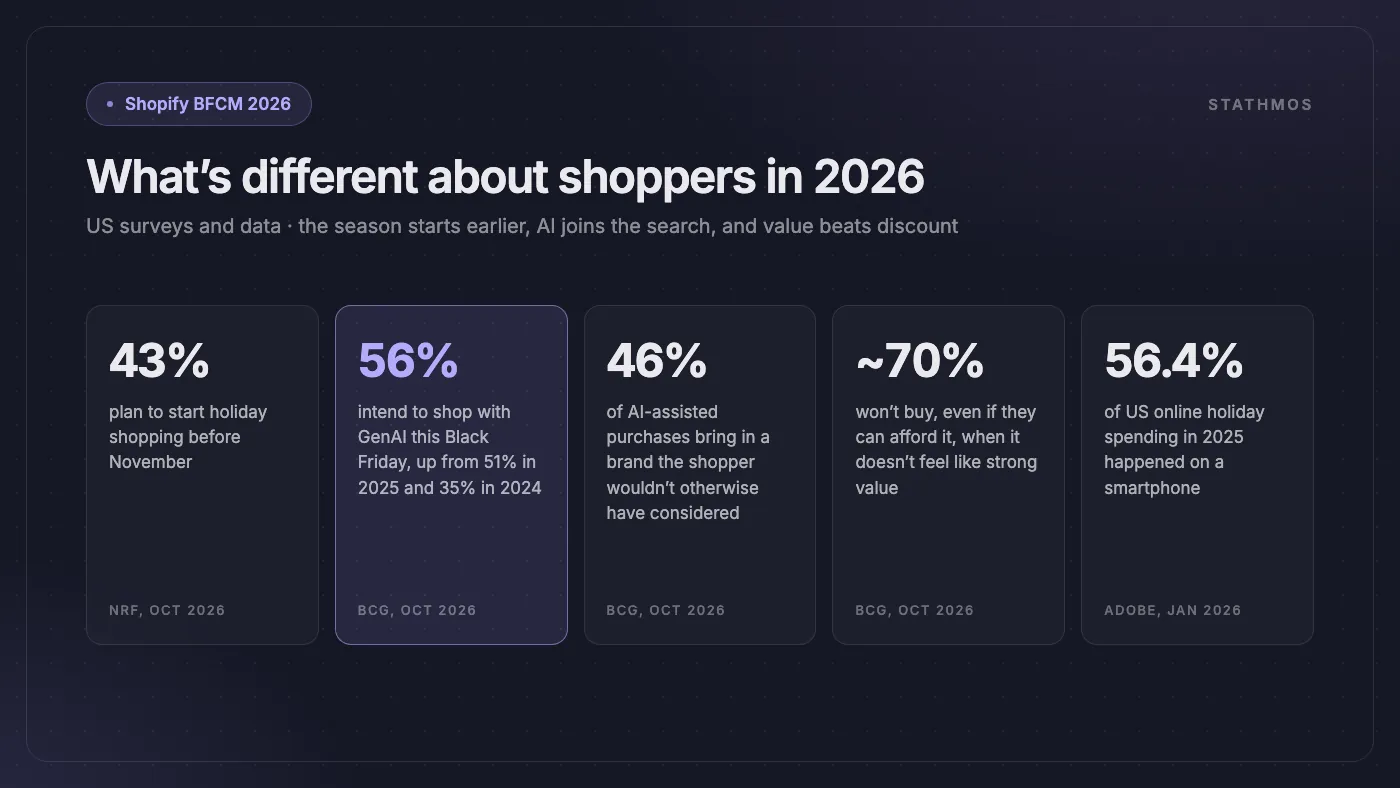
- Shoppers start earlier. 43% of US holiday shoppers plan to start before November (NRF). By Thanksgiving weekend last year, 84% had already started. Black Friday is now a season, not a day.
- Shoppers use AI to shop. 56% of US consumers intend to shop with generative AI this Black Friday, up from 51% in 2025 and 35% in 2024 (BCG). In 46% of purchases where AI plays a role, it introduces a brand the shopper wouldn't otherwise have considered. That is a new way to win customers, or to lose them.
- Shoppers want value, not just a discount. Nearly 70% say they won't buy a product, even if they can afford it, if it doesn't feel like strong value (BCG). Simple, honest offers beat complicated ones.
Step 1: Look at Last Year's Numbers
Before you plan anything new, open Shopify Analytics and look at BFCM 2025:
- Which products sold most? These are your heroes. Stock them first.
- Which products didn't move, even on sale? Don't spend ad money on them.
- Where did visitors leave? Follow the funnel: product page, cart, checkout, paid. A big drop at one step shows you what to fix.
- What was your average order value? Set a goal to raise it with bundles and a free-shipping threshold.
- Which emails and ads brought the most sales?
If this is your first BFCM, use your best month so far as the starting point.
Step 2: Sort Out Stock and Suppliers
Running out of a best-seller on Black Friday hurts. Being left with boxes of unsold stock in January hurts more.
- Order from suppliers now. Many are already busy, and shipping takes longer in November.
- Ask Sidekick. Shopify's AI assistant can recommend what to reorder and how much, based on what has been selling. It can then create the purchase order for you to check. You need suppliers set up and inventory tracking on.
- Turn on inventory tracking for every product. With tracking on, Shopify's default is to stop selling at zero, so you don't oversell and refund. Note this setting doesn't apply to orders placed in Shopify POS.
- Plan for slow stock. Bundle it with a best-seller, or use it as a gift above a spend limit (Step 4).
- Sync stock everywhere you sell: online, in store and on marketplaces.
Step 3: Make the Store Fast, Especially on a Phone
Last holiday season, 56.4% of US online holiday spending happened on a smartphone (Adobe). Those shoppers are often on a slow connection, with little patience. Speed is worth money: in a Google-commissioned Deloitte study (2020), a 0.1-second faster mobile site lifted retail conversions by 8.4% and order value by 9.2%.
- Test on a real phone: your homepage, your best product page and checkout.
- Remove apps you don't use. Many apps add code to your storefront, even when you're not using them. Our Shopify app audit guide shows how to find the slow ones.
- Compress big images. Product photos should be sharp, not huge.
- Check pop-ups, chat widgets and tracking scripts. They are common speed killers.
- Run PageSpeed Insights on your key pages, note the scores, and run it again after your fixes. Here is why that score matters for sales.
Step 4: Plan an Offer That Protects Your Margin
A deep discount on everything is the easy option, and the quickest way to lose money on your biggest weekend. Pick offers that raise the order value, not just the order count. Here is what Shopify can do on its own, and what needs an app:
| Offer | How on Shopify | Watch out for |
|---|---|---|
| Money off above a spend, or free shipping over $75 | Built in: amount-off discount with a minimum purchase | Set the threshold just above your current average order |
| Fixed bundles and multipacks | Built in: the free Shopify Bundles app, all plans | No mix-and-match bundles; that needs a third-party app |
| Free gift with purchase | Built in: Buy X get Y, with the gift set to free | The gift is never added to the cart for the shopper. Tell them to add it |
| Tiered deals (10%, 15%, 20% off) | Needs a discount app, or Checkout Blocks on Shopify Plus | Test the maths at checkout |
| VIP early access | Built in: automatic discount for up to 5 customer segments | Shoppers are matched by email or phone at checkout |
Use automatic discounts, not codes. They apply at checkout without the shopper doing anything, while codes get forgotten, mistyped or shared on coupon sites. You can have up to 25 automatic discounts active at once.
Keep it simple. One clear headline deal beats five confusing ones: if you can't write your offer in one sentence, it is too complicated. Then set your dates now: early access, launch, the weekend, Cyber Monday, and the end. If stock and margins allow, Shopify's own checklist suggests announcing offers before the weekend and running them into December.
Step 5: Build One Sale Page and Schedule the Switch
Make one Black Friday collection and send every ad, email and post to it. Keep the same address every year, such as /collections/black-friday, so it builds search value over time. Shopify's tip: make it a smart collection with the condition Compare-at price is not empty, so discounted products join and leave it by themselves.
- An announcement bar with the offer and end date
- The homepage banner switched to the sale
- Sale badges, with the final price next to the old one
- A countdown to the real end of the sale
- Black Friday one tap away in the menu
Then use Rollouts (Markets → Rollouts in your admin) to schedule the sale version of your theme, discounts and product changes for a set date and time. Choose an Event and Shopify rolls the changes back when it ends, so nobody has to be awake at midnight clicking publish. Rollouts work on the Basic plan or higher, but not on vintage themes, and they can't change Liquid templates.
Step 6: Get Ready for AI Shoppers (New for 2026)
This is the biggest change this year. Shopify says 65% of shoppers will use AI for at least one shopping task this season. Shopify's answer is Agentic Storefronts: your products can be found, and in some channels bought, inside ChatGPT, Google AI Mode and Gemini, Microsoft Copilot and Meta. It is on by default for eligible stores, and orders arrive in your admin with the channel they came from.
| AI channel | Shoppers in | Where they pay |
|---|---|---|
| ChatGPT | US | Your own Shopify checkout |
| Microsoft Copilot | US | Direct checkout in the channel |
| Google AI Mode and Gemini | US, Canada, Australia | Direct checkout (rolling out) |
| Meta | US, Canada, Mexico, Brazil, Japan, Singapore | Direct checkout in the channel |
No channel reaches shoppers in the EU or UK yet. Your store can be based anywhere; what counts is where your customers are.
- Check your setup. In your admin, go to Sales channels → Agentic. You need published Terms of service, Privacy policy and Return and refund policy pages, or the channels won't run.
- Clean up product data on your top 20 products. AI tools read your title, description, images, type, vendor, collections, tags, barcode and variants. Put the key detail in the title (size, material, fit, capacity). Give variants real names, like "Navy, Large", not codes. Write shipping, returns and warranty terms in plain words. Google reads your products through Google Merchant Center, so check that feed too.
- Collect reviews now. Shopify, OpenAI and Google all say reviews feed into how AI tools rank and describe products. Ask recent customers while there is still time.
- Know what direct checkout can't do. Bundles, subscriptions and personalised products can't be bought there, and Google Analytics and custom pixels don't fire there. So GA4 will under-count these orders. Count them in Shopify instead.
- Watch the Agentic page. It shows sales, orders and conversion for each AI channel, and the search queries your products appear for.
Want to go deeper? We cover how to get products recommended by ChatGPT and Perplexity, Shopify's AI search and product discovery, and our agent-readiness audit of catalogue and checkout.
Step 7: Remove Friction From Checkout and Payments
Every extra step or surprise at checkout costs orders. Make paying quick.
- Turn on Shop Pay. 32% of BFCM 2025 orders on Shopify used it, and Shop Pay sales grew 39%.
- Offer pay-later where you can. More than a third of US consumers (37%) now use buy now, pay later, according to AlixPartners. Shop Pay Installments works in the US, Canada and the UK, with Australia in early access, but not in Germany, France or Italy. Klarna is available through Shopify Payments in many European countries.
- Offer Apple Pay, Google Pay and PayPal. Note Google Pay through Shopify Payments works everywhere except France.
- Add trust signals near the pay button: secure checkout, return policy, delivery estimate.
- Keep upsell pop-ups out of checkout. Pre-purchase offers belong in the cart, post-purchase offers after the order.
- Sell abroad in the shopper's currency. 16% of BFCM 2025 orders were cross-border. Local currency needs Shopify Payments or Adyen. Shopify can also collect duties at checkout; they are estimates, and there is a fee.
Step 8: Plan Your Email, SMS and WhatsApp
Email goes to people who already know you. Plan it now, don't improvise it on the day.
- Grow the list now with a pop-up that offers early access in exchange for an email or phone number. Run it all of November.
- Segment the list: VIPs (2+ orders), past buyers, subscribers who never bought, and recent cart abandoners. Each group gets a slightly different message.
- Check your automations. Turn on abandoned checkout recovery at Apps → Messaging → Automations. Make sure the abandoned cart and welcome emails mention the sale and link to the sale page.
| When | What to send |
|---|---|
| Early November | Warm-up: new arrivals or a gift guide, no discount yet |
| 1 week before | Teaser: the sale is coming, with a hint |
| 1–2 days before | VIP early access |
| Black Friday morning | Launch: the offer and one button to the sale page |
| Saturday or Sunday | Reminder: best-sellers running low |
| Cyber Monday | Last chance: ends tonight |
SMS and WhatsApp are built into Shopify Messaging (formerly Shopify Email), paid per message. Use them for the two moments that matter most, launch and last chance, and only for people who opted in. Check your countries first: Shopify's SMS reaches 12 countries, including the US, Canada, the UK and Italy, but not Germany or France. WhatsApp marketing can't be sent to US customers.
Step 9: Ads and Social
- Start early and small. Warm up your audience with a small campaign in early November, then retarget those visitors during the sale.
- Keep your product feed clean. Google Shopping, Meta and now AI channels all read it. Missing images, wrong prices or sold-out items waste money.
- Try Shop Campaigns. Shopify's own ads, where you pay only when a shopper from your chosen audience (new, lapsed or all) buys. Ads in ChatGPT and on Pinterest are US only for now; Google and Meta placements cover the US, Canada, the UK and Australia.
- Line up creators. In our experience, short videos of real people using the product often beat polished ads in a crowded week.
Step 10: Shipping, Returns, Support and Fraud
- Shipping: show delivery cut-off dates ("order by X for Christmas"), confirm your courier's holiday schedule and rates, and pack best-sellers early where you can.
- Returns: decide now whether sale items have different rules, and say so on the product page and at checkout.
- Support: update your FAQ with the sale, shipping dates and returns. Prepare saved replies for "Is this in stock?" and "Why doesn't my code work?". Decide who is on duty, and who can approve an emergency change.
- Fraud: Shopify's fraud analysis rates eligible card orders as low, medium or high risk. Decide now what your team does with high-risk orders, so nobody guesses on Saturday night.
Step 11: Test Everything, Then Freeze the Store
About two weeks before Black Friday, around 13 November, shop your own store like a customer:
- Place a test order through every discount, bundle and gift, and check the maths at checkout.
- Do it on a phone, not just a laptop.
- Check that the order confirmation and shipping emails arrive.
- Check every campaign email: links, images, discount and dates.
- Check that sold-out products stop selling.
- Check your pixels (Meta, Google, GA4) record a test purchase.
- Check the store in every currency and market you sell in.
Freeze from 20 November. No theme, app or checkout changes after that. A small tweak on Thursday night is how stores break on Friday morning. If something must change, one person approves it and another tests it.
Step 12: What to Watch During the Weekend
Keep Live View open. Shopify recommends it for exactly this weekend. Watch:
- Sales against your goal. Set a target in Analytics to get a progress gauge. For an alert, say at 90% of target, build a Shopify Flow automation; targets don't alert on their own.
- Stock on your top 10 products. Ask Sidekick to check for items about to run out.
- Checkout conversion. A sudden drop means something broke: a discount, an app or a payment method.
- Speed. If pages slow down, pause heavy scripts.
- Your inbox and social messages. A fast reply often saves the sale.
Print a short "if this breaks, do this" list: discount not working, site slow, product oversold, payment failing.
Step 13: After BFCM, Keep the New Customers
Many BFCM buyers are first-time customers, and most stores never see them again. Keeping them is the real prize of the weekend.
- Send a thank-you email within 48 hours: no sale, just thanks and a tip for using the product.
- Send a second-purchase offer in December, timed to land after their first order arrives.
- Start a loyalty or referral reward so they come back in January.
- Track how many BFCM buyers order again within 90 days.
- Write down what worked and what broke. You'll thank yourself next October.
Your Black Friday 2026 Timeline
| When | Do this |
|---|---|
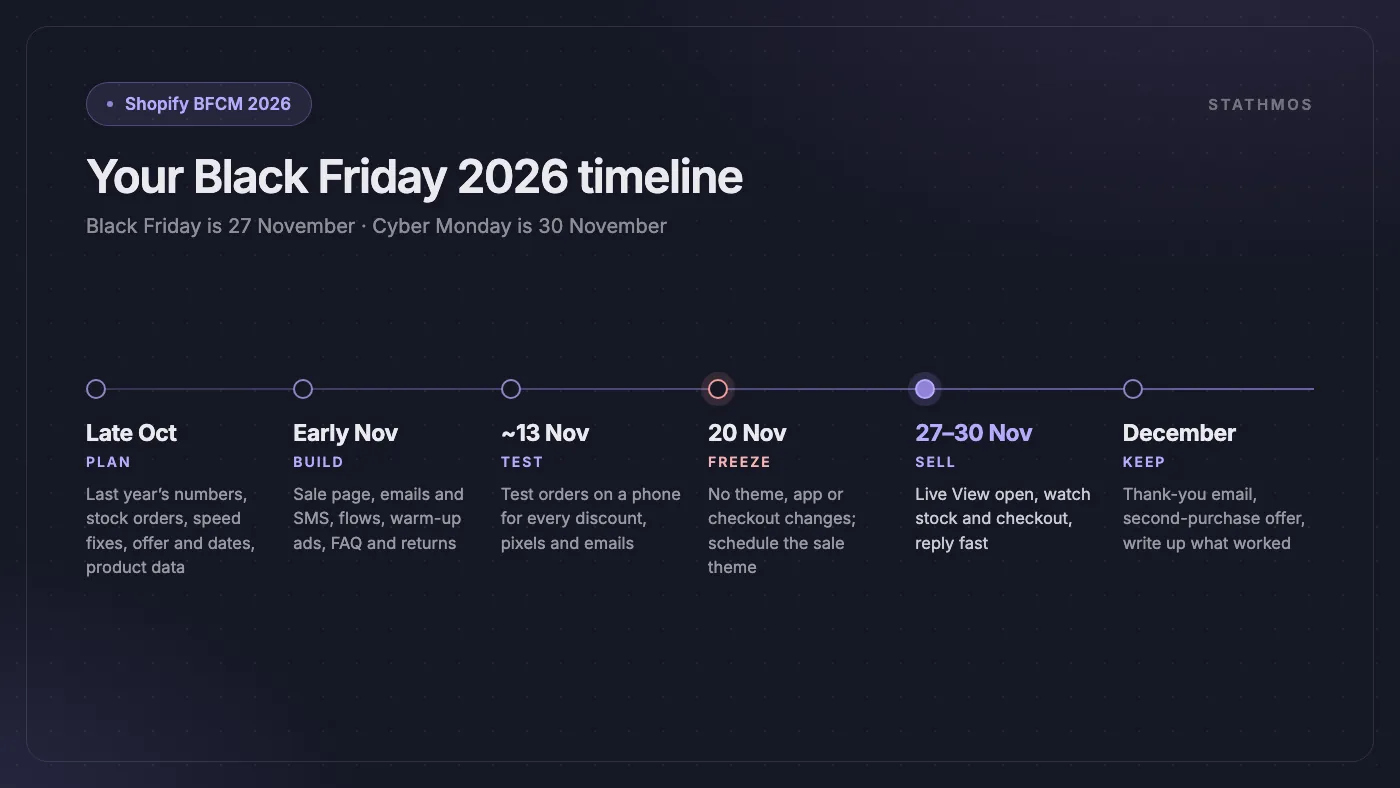
| Now (late October) | Review last year, order stock, speed-test the store, set the offer and dates, check Agentic Storefronts and fix your top 20 products, start the early-access pop-up |
| Early November | Build the sale page, write and schedule emails and SMS, update automations, start warm-up ads, update the FAQ and return policy |
| Around 13 November | Test orders through every discount on a phone, test pixels and emails, brief the team |
| From 20 November | Freeze the store, schedule the sale in Rollouts, send the teaser and VIP emails |
| 27–30 November | Keep Live View open, watch stock and checkout, reply fast |
| December | Thank-you emails, second-purchase offer, write up what worked |
When This Guide Doesn't Fully Apply
- You sell mainly in Europe. Agentic Storefronts, Shop Pay Installments and Shop Campaigns' ChatGPT and Pinterest ads don't reach EU shoppers yet, and Shopify's SMS doesn't reach Germany or France. Put that time into speed, offers and email instead.
- You sell services, subscriptions or made-to-order products. Bundles, subscriptions and personalised items can't use direct checkout in AI channels, and deadline-driven discounts may not suit a booked service.
- Your store is headless. Rollouts schedule changes to a Shopify theme, so they won't switch a custom front end, and the Agentic page doesn't yet show analytics for headless stores. Plan the sale switch with your developers.
- You have less than two weeks. Skip the new projects. Do Steps 2, 3, 4 and 11 well: stock, speed, one offer, and testing.
Frequently asked questions
When is Black Friday 2026?
Black Friday is on Friday 27 November 2026, the day after US Thanksgiving (26 November). Cyber Monday is on 30 November 2026.
When should I start preparing my Shopify store for Black Friday?
Now. Order stock and fix speed in late October, build the sale page and emails in early November, test around 13 November, and freeze the store from 20 November. 43% of US shoppers plan to start before November, so early offers matter too.
What are Shopify Agentic Storefronts?
A Shopify feature that lets shoppers find your products in AI tools such as ChatGPT, Google AI Mode and Gemini, Microsoft Copilot and Meta, and buy them there or on your checkout. It is on by default for eligible stores and is managed under Sales channels → Agentic. It currently reaches shoppers in the US and a few other countries, not the EU or UK.
Should I use discount codes or automatic discounts for Black Friday?
Automatic discounts, in most cases. They apply at checkout without a code, so nobody forgets or mistypes one, and they can target up to 5 customer segments, which suits VIP early access. Keep codes for specific partners or influencers.
Can I schedule my Black Friday theme on Shopify?
Yes. Use Rollouts, under Markets → Rollouts, to schedule theme, discount and catalogue changes for a set date and time. An Event rolls the changes back when it ends. It works on the Basic plan or higher, but not on vintage themes.
Need a Hand Before 20 November?
We build and speed up Shopify stores, and we know what breaks under BFCM traffic. Our Shopify development team can set up offers, Rollouts and Agentic Storefronts, and our page speed service can trim slow apps and scripts before the freeze. Tell us about your store and we will reply within one business day.
Sources
- Shopify: BFCM 2025 data
- Shopify: Black Friday Checklist 2026
- Shopify: Welcome to the first holiday season of the agentic era
- U.S. Office of Personnel Management: Federal holidays
- NRF: Affordability shapes winter holiday shopping (2026 holiday survey)
- NRF: Thanksgiving holiday weekend draws a record 203 million shoppers
- BCG: The AI-powered holiday, what retailers need to know
- Adobe: 2025 holiday shopping season results
- AlixPartners: US holiday sales expected to grow 4.7% this season
- Google and Deloitte: Milliseconds Make Millions
- Shopify Help: Agentic storefronts
- Shopify Help: Managing agentic storefronts
- Shopify Help: AI channels with built-in checkout
- Shopify: Enhanced inventory management with Sidekick
- Shopify Help: Selling when out of stock
- Shopify Help: Shopify Bundles
- Shopify Help: Discount types
- Shopify Help: Buy X get Y discounts
- Shopify Help: Managing discounts
- Shopify Help: Rollouts
- Shopify Help: Shop Pay Installments
- Shopify Help: Klarna
- Shopify Help: Google Pay
- Shopify Help: Local currencies
- Shopify Help: Charging duties and import taxes
- Shopify Help: Shopify Messaging
- Shopify Help: SMS marketing requirements
- Shopify Help: WhatsApp marketing requirements
- Shopify Help: Shop Campaigns
- Shopify Help: Shop Campaigns eligibility
- Shopify Help: Fraud analysis
- Shopify Help: Live View
- Shopify Help: Targets
- OpenAI Help: Shopping with ChatGPT search
- Google: Agentic checkout and AI shopping for the holidays