
WooCommerce 11.0 landed on Tuesday, August 4, 2026 — a week later than originally planned, and for a good reason. This is a big release: 551 pull requests from 89 contributors, a database update, and one meaningful removal that a small number of stores will feel immediately.
If you run a WooCommerce store, here's what actually changed, what it means for your day-to-day, and what to check before you hit update.
First, the Release Itself
WooCommerce originally targeted July 28 for 11.0. During testing of the first release candidate, the team found a fatal error triggered under specific conditions by one of the new performance features. Rather than ship it to a plugin with more than 7 million active installations, they held the release for a week, cut a second release candidate on July 29, and shipped on August 4.
The team didn't announce any change to the release's scope alongside the delay — the advisory addressed the timeline only.
- WordPress
- 6.9 or higher
- PHP
- 7.4 or higher
- Tested up to
- WordPress 7.0 (the WordPress.org listing currently shows 7.0.2)
The release is backwards compatible, but it does require a database update. WooCommerce will prompt you for this after the plugin files update — don't skip it, and don't leave it half-finished.
Your Store Should Feel Faster
Performance was the headline theme of 11.0, with 28 pull requests tagged for performance, caching, or scalability. Two changes matter most.
Product object caching is now on by default
This is the big one. WooCommerce now caches product objects by default, and the measured impact is real:
- Variable products load roughly 9–12% faster on product pages
- Bundle products process 6–12% faster during checkout
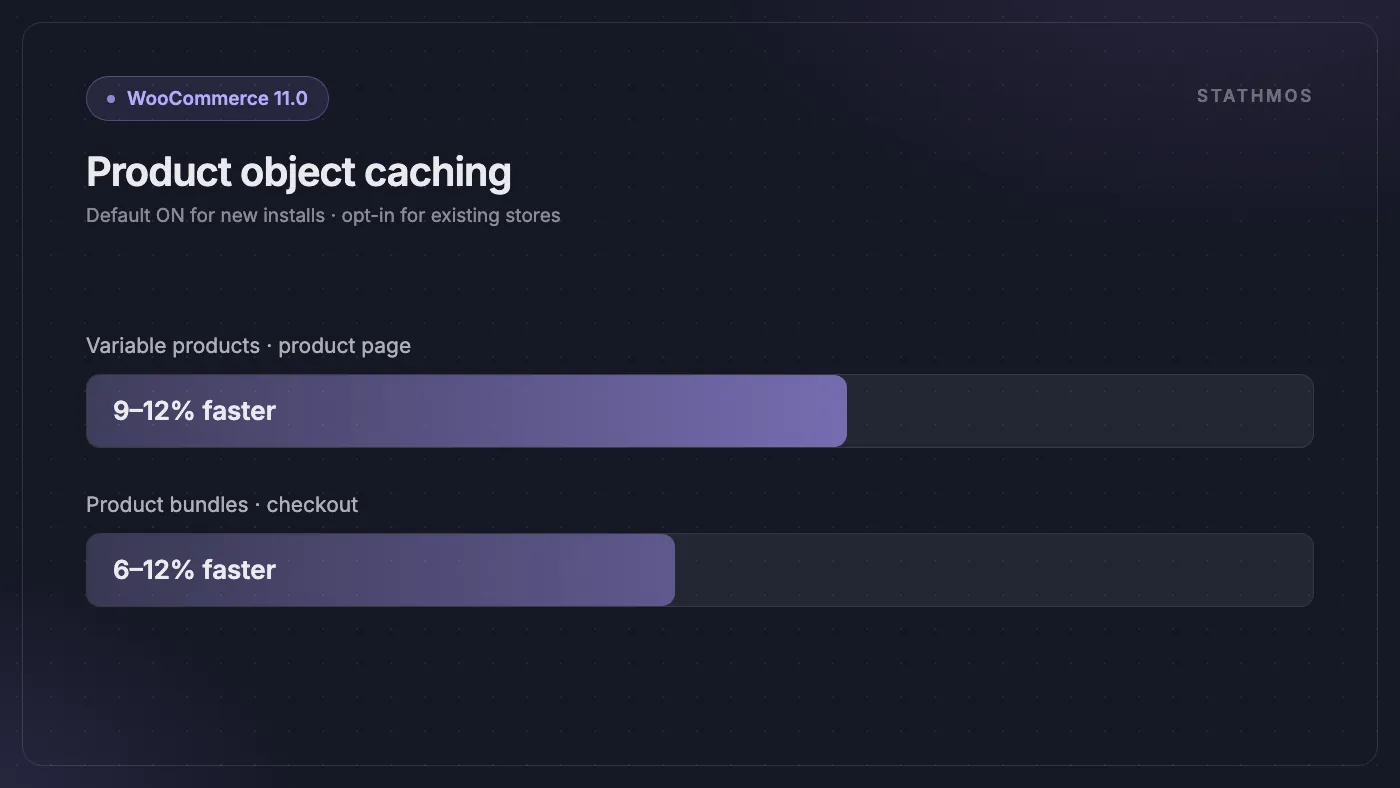
Here's the important caveat: this is enabled by default for newly installed stores only. Existing stores are unaffected and keep the opt-in default — you can turn it on yourself to test it, and WooCommerce has said a wider rollout is planned for a future release.
If you sell variable products or bundles at any volume, this is worth testing on staging and then enabling. It's the single highest-leverage change in the release for most catalogues. And if product pages still feel slow with caching on, the bottleneck is usually the front end rather than the database — that's page speed optimization territory.
The Orders screen stops crawling
If your store uses High-Performance Order Storage and you've watched the Orders screen think about it for a few seconds every time you load it, 11.0 rewrites the queries behind that screen. The optimisations target the two slowest cases specifically: lists filtered across multiple order statuses, and the count queries that fire when you load the screen with an empty search box.
Product admin also gets persistent status counters, so the "Published / Draft / Trash" counts above your product list no longer need to be recalculated from scratch on every page load.
Behind the scenes
Two more changes that mostly matter if you run a headless storefront or a large catalogue:
- Store API now limits and de-duplicates product collection-data requests. Requests that exceed the limit return an HTTP 400, and the limit is adjustable via filter — so if you have a legitimate reason to request more, your developer can raise the ceiling.
- POS catalogue generation moved to chunked processing with a configurable chunk size and timeout, which stops large catalogues from timing out mid-generation.
Guests Can Now Claim Their Old Orders
This is the feature most likely to reduce your support tickets.
Until now, a customer who checked out as a guest three times and then created an account had no way to see those earlier purchases. Their order history started from zero. Every one of those customers who wanted a receipt, a warranty claim, or a re-order had to email you.
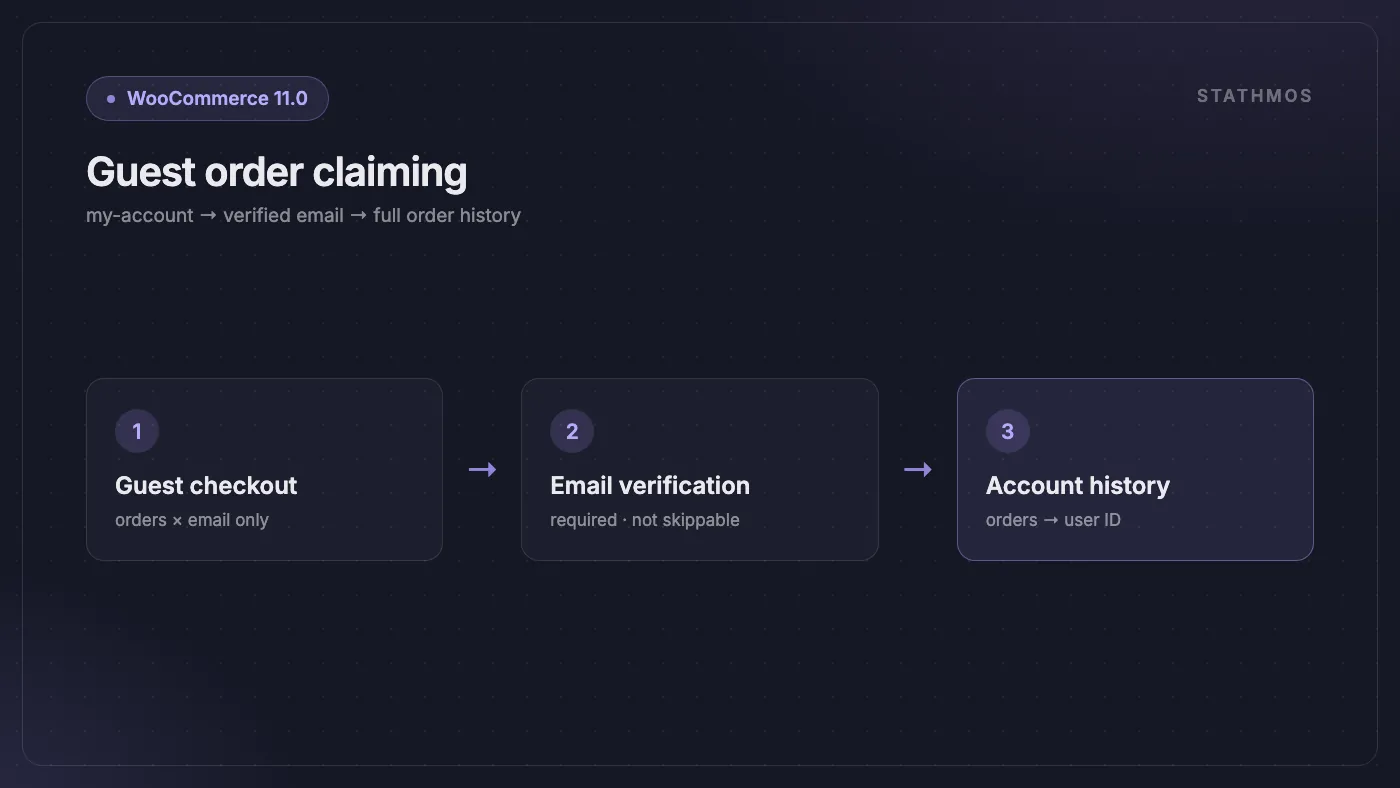
WooCommerce 11.0 closes that gap. A logged-in customer can now look up orders placed under their email address as a guest, confirm ownership through an email verification link, and have those orders connected to their account. Once verified, the order records are mapped to their user ID and appear in their normal order history.
The verification step is not optional and not skippable — the association only happens after the customer proves they control the email address. That's what keeps it from becoming an order-history leak.
This builds directly on the post-checkout account creation flow that arrived in WooCommerce 9.5, and completes the loop: guests can create an account after buying, and now that account can inherit everything they bought before it existed.
Analytics You Can Actually Trust
Three fixes here, and each one addresses a specific way WooCommerce Analytics used to mislead you.
Refunds now land in the right month. The v3 sales report adds a refunds value to each date bucket. Previously, refund handling made month-over-month net sales comparisons unreliable — a refund issued in June against a May order distorted one period or the other. Now refunds are counted in the period they actually occurred. (The older v1 and v2 report endpoints are unchanged, so nothing you've built against them breaks.)
Failed historical imports are visible and retryable. If you've ever migrated a store, kicked off a historical Analytics import, and quietly ended up with gaps in your reports, you'll appreciate this. Failed import jobs now surface in the admin with a retry button. Two new endpoints back it: GET /wc-analytics/imports/status and POST /wc-analytics/imports/retry-failed.
Session counts stop being inflated. Analytics events now require a stable visitor ID. Bots and transient clients that connect briefly and vanish no longer register as sessions. Expect your session numbers to drop after updating — that's the fix working, not a regression. Your conversion rate should get more honest at the same time.
Smaller Changes That Add Up
Stock holds default to 60 minutes. When stock is reserved for an order that hasn't completed checkout, the hold now defaults to one hour if the caller omits a duration. If you sell limited-stock items and need a shorter or longer window, your developer can pass an explicit duration.
International phone numbers work better. Two new hooks — woocommerce_validate_phone and woocommerce_format_phone_number — let developers handle local number formats and non-English numerals, and control how numbers are displayed separately from how they're validated. A new WC_Validation::is_phone_format() method does country-agnostic shape checking. If you sell internationally and have had customers bounce off phone validation at checkout, this is the fix.
Cleaner email previews. A new woocommerce_email_preview_show_shipping_details filter hides the placeholder shipping details in email previews — useful if you're designing templates for digital products and don't want fake addresses in the mockup.
Richer block emails. The block-based email editor now supports Vimeo, TikTok, and Dailymotion embeds, rendered as clickable thumbnails.
Accessibility improvements. Cart tables and admin screens got accessibility work, including colour contrast changes to meet WCAG 2.2 AA.
Still in Beta: Checkout Recovery
WooCommerce is building abandoned cart recovery into core, and 11.0 continues it as an opt-in beta. You can enable it under WooCommerce → Settings → Advanced → Features.
What's in it right now: recovery emails for abandoned checkouts, the ability to manually send a recovery email from an eligible order, a filter for which order statuses count as eligible (woocommerce_checkout_recovery_eligible_statuses), and a one-click unsubscribe path with privacy handling built in.
That last part matters. Recovery email is exactly the kind of feature that creates compliance risk if it's bolted on badly, and having unsubscribe and privacy handling in core from the start is the right call. If you currently pay for a third-party abandoned cart plugin, this is worth watching — but it's a beta, so test it somewhere that isn't your live store.
A new React-based Settings UI is also rolling out, with settings forms migrating to a shared DataForm component.
The One Thing That Might Break: Product Editor Beta
WooCommerce 11.0 fully removes the experimental Product Editor. The @woocommerce/product-editor package, its feature flag, its dedicated routes, and its extension points are all gone.
If you enabled the new product editor beta, your store reverts to the classic product editor after updating. Nothing is lost — your products are fine — but the interface you've gotten used to disappears.
The bigger risk is extensions. If any plugin on your store was built against the product editor package or its experimental APIs, it needs an update. Check with your extension vendors before you update, particularly for anything that added custom fields or tabs to the product editing screen.
Two other changes worth flagging to whoever maintains your theme: the Product Image block dropped its Resolution attribute in favour of standardised responsive images, and the queried object on the Shop page is now a WP_Post rather than a WP_Post_Type. A theme doing something clever with the shop page query may need a look.
Action Scheduler 4.0.0 Comes Along for the Ride
WooCommerce 11.0 bundles Action Scheduler 4.0.0 — the background job queue that runs your scheduled emails, subscription renewals, webhook deliveries, and much of what your extensions do out of sight. The major version bump is deliberate: it signals backwards-incompatible changes.
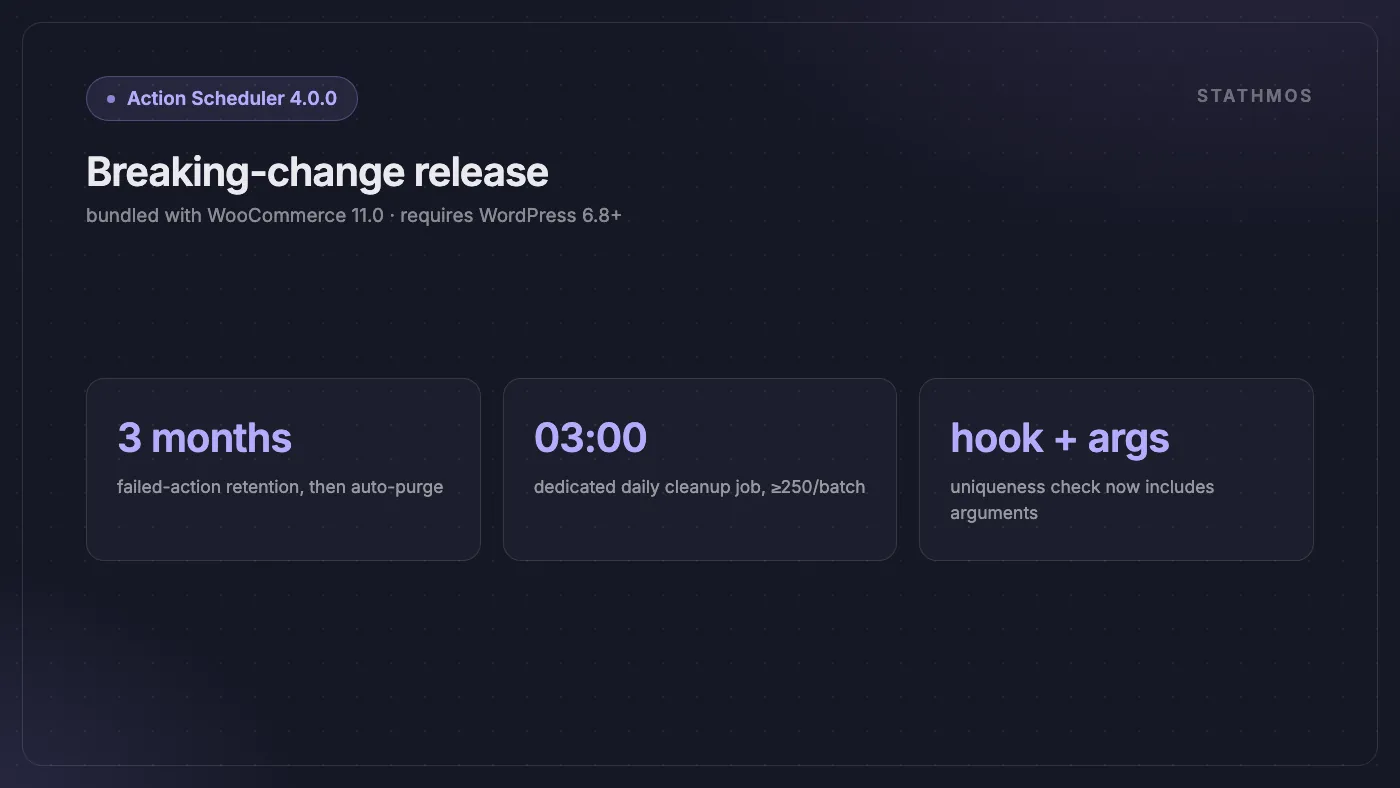
Failed actions are now cleaned up automatically, purging after three months. This is genuinely good news for high-volume stores, where failed actions accumulating forever is a well-known source of database bloat. The retention window is adjustable via the action_scheduler_retention_period_for_failed filter, and the whole behaviour can be switched off with action_scheduler_enable_failed_action_cleanup if you have a reason to keep everything.
Uniqueness checks now include arguments. Previously, deduplication looked only at the hook and group. If two jobs shared a hook but carried different parameters, one could be silently discarded as a duplicate. Now the arguments are part of the comparison — which is correct, but means stores that were unknowingly relying on the old behaviour will see more actions created than before.
Cleanup runs as a dedicated daily job at 3 AM site time, processing at least 250 actions per batch, instead of running inline during queue processing. Batch size is adjustable via action_scheduler_cleanup_batch_size. Action Scheduler 4.0.0 requires WordPress 6.8 or higher.
Your Update Checklist
- Confirm your environment. WordPress 6.9+ and PHP 7.4+ are required. If you're behind on either, sort that first.
- Update on staging. Take a fresh copy of production, update there, and run the database update.
- Audit your extensions. Anything touching the product editor, background jobs, or the Store API deserves a specific check. Ask vendors about 11.0 compatibility.
- Place test orders. Guest checkout, logged-in checkout, a variable product, a bundle if you sell them. Confirm taxes and shipping calculate correctly.
- Check background jobs. Watch the Action Scheduler queue for a day and confirm scheduled tasks still fire — this is where the Action Scheduler 4.0.0 changes would show up.
- Know your rollback. Have a database backup and a documented path back to 10.9 before you touch production.
- Then consider product object caching. Once 11.0 is stable on your store, test enabling it on staging and measure the difference on your own catalogue.
Should You Update?
Yes — but not today, and not straight to production.
WooCommerce 11.0 is a strong release. The performance work is measurable rather than hand-wavy, the guest order claiming feature solves a real support burden, and the analytics fixes correct numbers that have quietly been wrong. The Action Scheduler cleanup alone will save some stores from a slow-growing database problem.
The risk profile is narrow but not zero: the Product Editor removal and the Action Scheduler behaviour changes are the two places where a store could get surprised. Both are entirely manageable if you test on staging first — which, given this release needed a second release candidate to shake out a fatal error, is advice worth taking seriously.
And if this release has you thinking about WooCommerce's longer-term fit for your store, two of our earlier pieces are the honest place to start: what WooCommerce actually costs in year two, and the scorecard we use to decide when leaving WooCommerce is justified — and when it is not.
Frequently asked questions
What are the requirements for WooCommerce 11.0?
WordPress 6.9 or higher and PHP 7.4 or higher, and the release requires a database update after the plugin files install. The bundled Action Scheduler 4.0.0 itself requires WordPress 6.8+.
Why was WooCommerce 11.0 delayed?
The team found a fatal error triggered under specific conditions by one of the new performance features while testing the first release candidate. They held the release a week, cut a second release candidate on July 29, and shipped on August 4, 2026.
Is product object caching enabled on my existing store?
No — it is on by default for newly installed stores only. Existing stores keep the opt-in default; you can enable it yourself and test on staging, and WooCommerce plans a wider rollout in a future release.
What might break when I update to 11.0?
The experimental Product Editor is fully removed, so any extension built against it needs an update, and Action Scheduler 4.0.0 changes uniqueness checks and failed-action cleanup in backwards-incompatible ways. Test both on staging before touching production.
Should I wait before updating to WooCommerce 11.0?
Update — but on staging first, not straight to production. Confirm your environment, audit extensions, place test orders, watch the Action Scheduler queue for a day, and keep a documented rollback to 10.9.
Sources
- WooCommerce 11.0 Release Notes — WooCommerce Developer Blog
- WooCommerce 11.0: What's coming for developers — WooCommerce Developer Blog
- WooCommerce 11.0 delay advisory — WooCommerce Developer Blog
- What's changing in Action Scheduler 4.0.0 — WooCommerce Developer Blog
- WooCommerce 11.0 Update — WooCommerce.com
- WooCommerce 11.0 readme.txt — GitHub
- WooCommerce — WordPress.org Plugin Directory
- WooCommerce 11.0 Delayed to August 4 — Digital Applied
- WooCommerce 11.0: What's New — Seravo
- WooCommerce 11.0 Technical Overview — Mantra Web Graphics
- WooCommerce 11.0 Release — Objects.ws
Running a WooCommerce Store?
We handle WooCommerce development for stores where the update path, the extension audit and the staging discipline described above are somebody's actual job — ours. If you'd rather someone else carries the 11.0 update, talk to us.