Facts checked on 26 October 2026 against PHP's release notes and the researchers' and security vendors' reports. We will update this post when PHP ships its next release.
If your website runs on PHP, update PHP today. That is the short version of this post.
On 21 October 2026 the PHP project released fixes for two critical security holes in PHP itself, known together as PHP2Shell. They let an attacker take over a web server from the internet, with no login and no password. Attackers were already trying them before the fix came out.
PHP is used by 69.2% of websites whose server-side language is known, according to W3Techs. That includes WordPress, WooCommerce, Magento, Drupal, Joomla, Laravel and most custom PHP sites. So this is not a problem for a few people. It is a problem for a large part of the web.
For Website Owners: PHP2Shell in Plain English
Not technical? This part is for you. PHP is the software on your web server that runs your website, a bit like the engine in a car. If your site is built with WordPress, WooCommerce, Magento, Drupal, Joomla or Laravel, it runs on PHP.
PHP2Shell is a pair of flaws in that engine. A stranger on the internet can send your website a specially made request and take control of the server behind it. They do not need a password or an account. The flaw is not in your theme or plugins, so updating those does not fix it. Only an update to PHP itself does.
Once in, an attacker can read passwords and keys stored on the server, reach your customer data, change your site or hide a backdoor to come back later. Attackers started trying this before the fix was even released, so this is not something to leave until next month.
What to do today:
- Ask your developer or hosting company one question: "Is our PHP updated to a version that fixes PHP2Shell, and was PHP restarted afterwards?" Ask for a yes or no, in writing.
- If the answer is no or "not sure", ask them to fix it today. If your site runs an old PHP version (8.1 or older), there is no ready-made update, so it needs an upgrade plan now.
- If it is already fixed, ask them to check the server for signs of attack since 17 October and to change the passwords and keys stored on it.
- If nobody looks after your server, or you cannot get an answer, get help now. Every day an unpatched site stays online is another day it can be found.
If your shop runs on Shopify or a similar hosted platform, you do not need to act: the platform runs the servers, not you.
The short answer
- Update PHP to 8.5.12, 8.4.27, 8.3.36 or 8.2.35 (or newer), then restart PHP-FPM, Apache or any long-running PHP worker. Updating WordPress, Magento or your plugins does not update PHP.
- On PHP 8.1 or older there is no ready-made official update. Move to a supported version, or use a hosting or Linux package that has backported both fixes.
- Cannot update today? Turn on your web firewall's PHP2Shell rules and the PHP settings in step 4 below. They lower the risk. They do not make you safe.
- After updating, treat secrets stored on the server as possibly leaked and look for signs of attack from 17 October 2026 onwards.
What is PHP2Shell?
PHP2Shell is the name the researchers gave to two bugs in the PHP engine, and to the exploit script that chains them. The bugs are not in your theme, plugin or code. They are in PHP itself, the software that runs your site on the server.
That is why it is so serious. The researchers at Wiz say that even a simple "Hello World" application on an affected PHP version can be vulnerable. For servers running Apache with mod_php, PHP itself says it has a demonstrated exploit that works "before any application code runs". Your site can be at risk even if your own code is perfect.
In plain words: when a request makes PHP run out of memory (or hit another fatal error at the wrong moment), PHP stops that request in a hurry, and in some places it does not tidy up properly. Half-built data, or data that should have been thrown away, is left behind, and PHP later treats it as valid, sometimes while handling the next visitor's request on the same worker. An attacker can trigger this on purpose with specially crafted form-upload requests, even on a page that never uses uploads, and turn it into running their own commands.
| CVE | Official name | What goes wrong |
|---|---|---|
CVE-2026-109618 | RCE via OOM corruption | Running out of memory leaves request data half-built, and PHP's clean-up then treats it as valid |
CVE-2026-109619 | RCE via stale global state | Internal state outlives the memory it points to, and a later request on the same worker can use it |
RCE means remote code execution: someone on the internet can run their own code on your server. OOM means out of memory. PHP rates both bugs 9.2 out of 10 (critical) on the newer CVSS 4.0 scale. The US National Vulnerability Database uses the older CVSS 3.1 scale and rates them 9.8 (critical) and 8.1 (high), so you may see those numbers too. The name PHP2Shell describes the result: from an ordinary PHP website straight to a "shell", full command access to the server.
What can an attacker actually do?
- Run commands on your web server, with no username or password.
- Read secrets from the server's memory. Wiz lists "passwords, authentication tokens, API keys and certificates". This does not even need the attacker to run code on your server, so it is quiet and hard to notice.
- Use those secrets to reach your database, customer data and payment provider accounts.
- Plant a hidden backdoor (a "web shell") to come back later, or change and deface your site.
How PHP2Shell happened
The bugs were reported in August, kept quiet while PHP built a fix, and then the release was pulled forward after the bug numbers leaked.
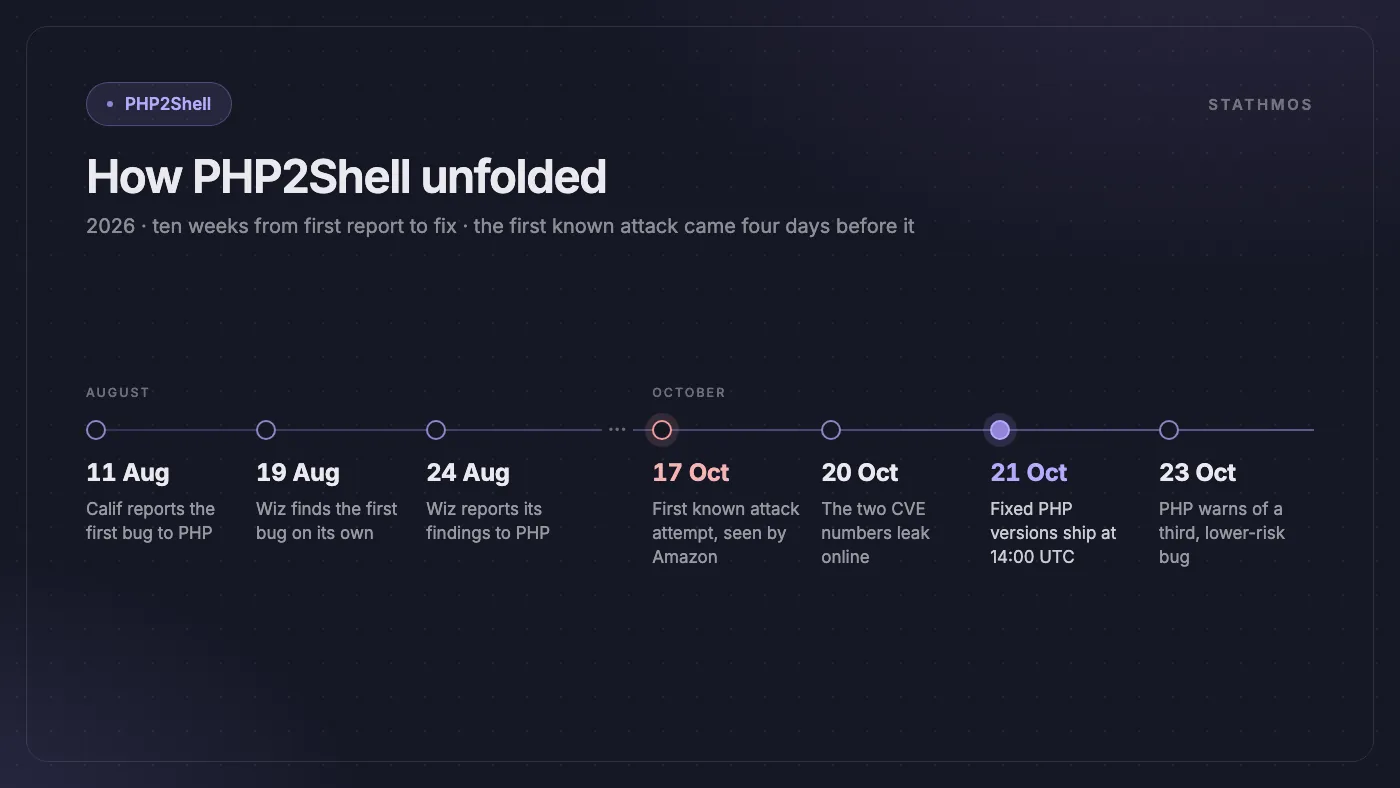
| Date (2026) | What happened |
|---|---|
| 11 August | Calif reports the first bug to the PHP team |
| 19 August | Wiz Research finds the first of the bugs on its own |
| 24 August | Wiz reports its findings to the PHP team |
| 17 October | Amazon's decoy servers record the first known exploitation attempt |
| 20 October | The two CVE numbers leak online, and PHP brings its release forward by a day |
| 21 October, 14:00 UTC | Fixed PHP versions released |
| 23 October | PHP warns about a third, lower-risk related bug |
According to the PHP Foundation, the two CVE numbers leaked on 20 October without technical details, though a video one research firm published by mistake revealed a few limited details. The Foundation also says a PHP core developer saw the first signs of the out-of-memory problem in an audit back in 2024, but it was not fixed at the time.
Why this one moved so fast
AI did much of the finding. Wiz says it used AI models (its own Wiz Atlas, Google's Gemini 4 Argon and OpenAI's GPT-5.6 Sol) and that "a single researcher completed in a week what previously would have taken a world-class team months". OpenAI's Codex Security team and Calif are credited alongside Wiz on the PHP2Shell site.
Attackers have the same tools. Amazon's threat intelligence team warns that AI makes it cheaper to turn a patch into a working exploit, so "more actors can act within hours or even minutes". Its advice for critical bugs in internet-facing systems: "measure patch and mitigation timelines in hours."
Who is affected by PHP2Shell?
PHP's official releases cover 8.2 to 8.5, and 7.4, 8.0 and 8.1 only got source-code patches. The researchers say affected releases go back to PHP 5.4, and that nearly every PHP version was hit by at least one of the two bugs. If your website, store or web app runs on PHP and you have not updated PHP since 21 October 2026, assume you are affected.
ProjectDiscovery's list names about 20 kinds of long-running PHP software worth checking. Anything that runs on PHP is in scope, including:
- WordPress and WooCommerce, Magento / Adobe Commerce, Laravel, Drupal and Joomla sites
- Moodle, Nextcloud and MediaWiki
- Admin tools such as phpMyAdmin, Roundcube webmail and WHMCS
- Hosting panels such as cPanel and Plesk
- Network appliances with PHP inside, from firewalls (pfSense, OPNsense) to phone systems (FreePBX) and monitoring tools (Zabbix, Nagios XI). Vendors are publishing their own bulletins; HPE's for ClearPass Policy Manager is one example.
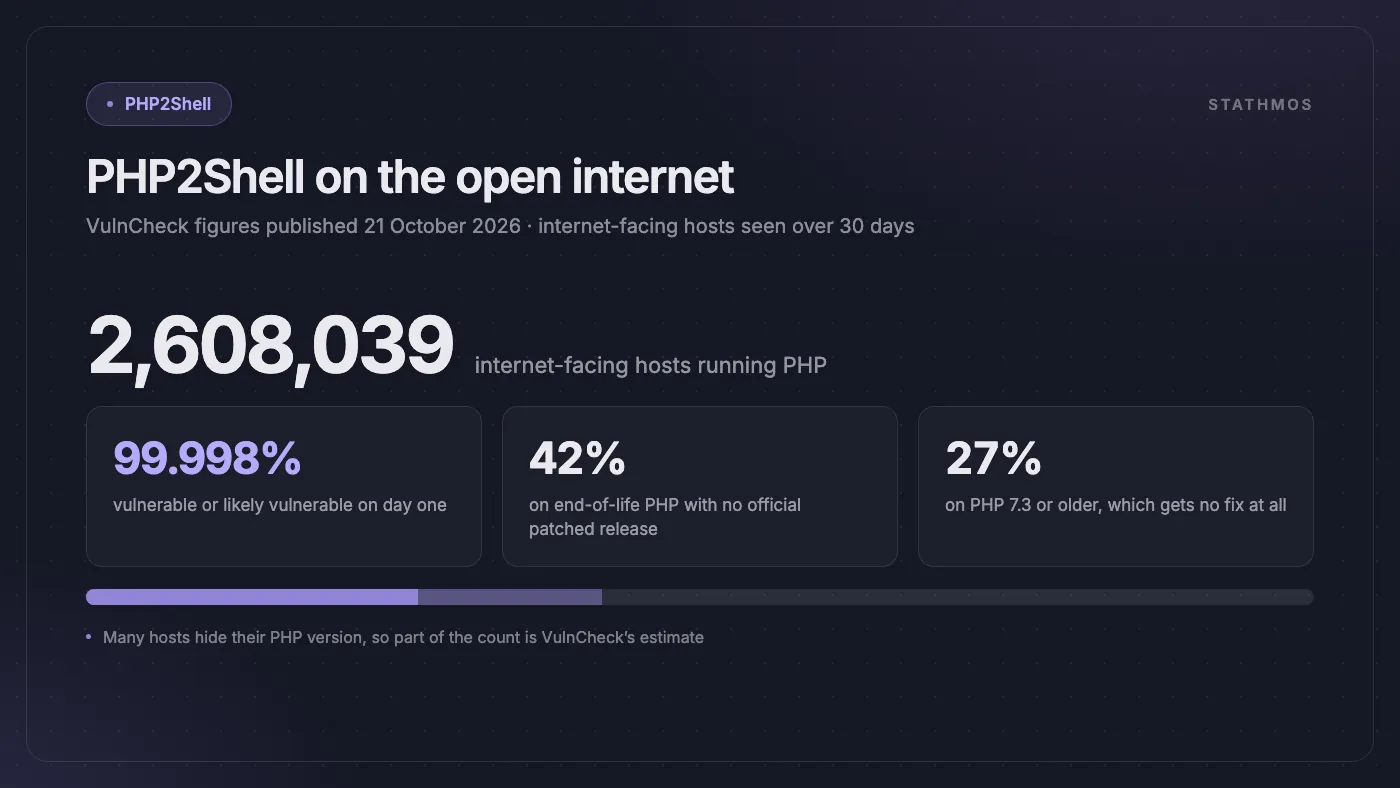
The scale is huge. In figures published on the day of the fix, VulnCheck counted PHP on 2,608,039 internet-facing hosts seen over the previous 30 days, and rated 99.998% of them vulnerable or likely vulnerable. More than 1.1 million of them, about 42%, run end-of-life PHP versions with no official patched release, and about 27% run PHP 7.3 or older. Many hosts hide their PHP version, so part of that count is VulnCheck's estimate.
Who is not affected
- Fully hosted platforms such as Shopify, where the platform runs the servers, not you. Any WordPress blog or PHP tool you run next to it still needs checking.
- Sites with no PHP anywhere on the server: Node.js, Next.js, Python or plain static HTML.
- Servers already on the fixed versions below and restarted since. (Keep an eye on the third bug further down.)
Fixed PHP versions
| Your PHP branch | Update to | Security fixes until |
|---|---|---|
| PHP 8.5 | 8.5.12 or newer | 31 Dec 2029 |
| PHP 8.4 | 8.4.27 or newer | 31 Dec 2028 |
| PHP 8.3 | 8.3.36 or newer | 31 Dec 2027 |
| PHP 8.2 | 8.2.35 or newer | 31 Dec 2026 |
| PHP 7.4, 8.0, 8.1 | No official build, only source patches. Move to 8.2 or newer | Ended |
| PHP 7.3 and older | No fix from PHP. You must upgrade | Ended |
Your version number may look old even when you are safe. Linux distributions and hosting providers often backport the fix under an older version string. ProjectDiscovery advises checking that the package changelog names both CVE numbers.
If you are on PHP 8.2, its security support ends on 31 December 2026, so plan the move to 8.4 or 8.5 now rather than patching twice. We weigh up the wider question in is PHP still the right choice for eCommerce.
Are attackers already using PHP2Shell?
Yes. Attack attempts started before the fix was public.
- Four days early: Amazon's MadPot honeypots (decoy servers built to attract attackers) recorded a PHP2Shell exploitation attempt dated 17 October 2026, four days before public disclosure.
- Before the release hour: Amazon reports proof-of-concept exploits appearing from around 02:00 UTC on 21 October, twelve hours before the fixed versions shipped, and more within hours after. It now reports "broad exploitation attempts in the wild".
- Automated scanning: VulnCheck saw scanners using the user-agent
php2shell-scan/109618, and one attempt from a China-based IP address to plant a web shell through a session file. That attempt failed. - Fake exploits: fake proof-of-concept repositories are circulating on GitHub. Never run downloaded exploit code on a server you care about.
Some organisations went offline rather than wait. According to the news reports collected on Wikipedia's PHP2Shell page, many European organisations took sites offline on the advice of CERT-EU and the UK's NCSC, and the US NSA recommended going offline if a site could not be updated straight away. Finland took its public-facing government web services offline, and the Internet Archive briefly shut down.
A third, lower-risk bug (23 October)
Two days after the main fix, PHP published an informational advisory about a related bug, CVE-2026-115560, in the same session upload progress feature. According to Cloudflare, it also affects the fixed releases, including 8.5.12. PHP calls it an "unlikely RCE vector" that needs an unusual session setup. Until the next regular PHP release, PHP suggests setting session.upload_progress.enabled=0.
How to protect your PHP website: five steps
Updating PHP is the only complete fix. PHP's security advisory is blunt: "There are no complete mitigations, updating is the only safe choice." Work through these steps in order.
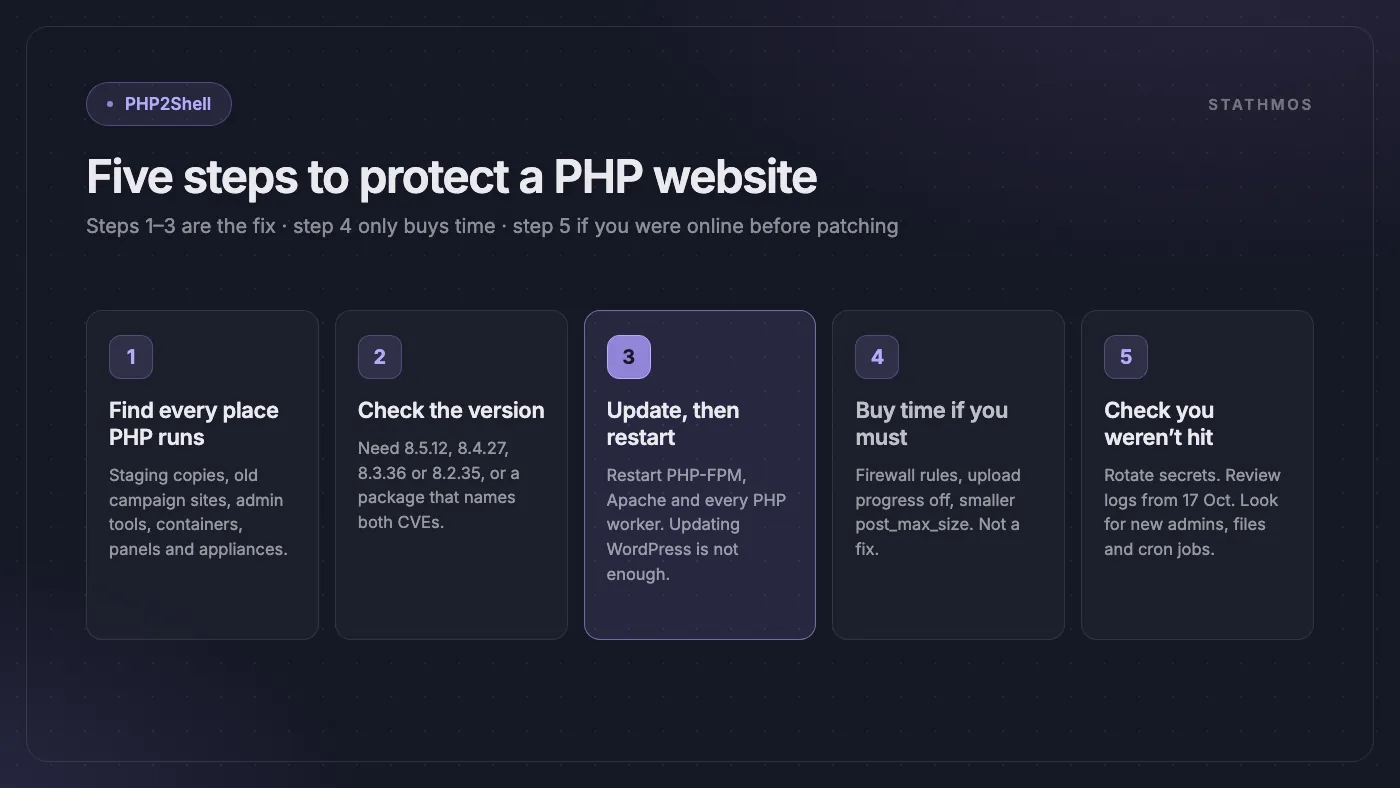
Step 1: Find every place PHP runs
Make a list of every server, site and tool you own that uses PHP. Do not forget:
- Staging and test copies of your site
- Old campaign sites or landing pages built by an agency
- Admin tools such as phpMyAdmin or webmail
- Docker containers built on an old
php:image - Hosting panels and network appliances
Forgotten sites are easy to miss and rarely patched. While you are at it, check that PHP-FPM's port 9000 is not reachable from the internet: ProjectDiscovery notes that the official php-fpm Docker images listen on it on every network interface. If you have inherited a codebase or a server nobody fully understands, our legacy PHP due-diligence framework is a good place to start.
Step 2: Check your PHP version
- Shared hosting or cPanel: look in your hosting panel under "Select PHP Version" or "MultiPHP Manager".
- Your own server (VPS): run
php -vandphp-fpm -von the server. On some systems the FPM command carries the version, for examplephp-fpm8.3 -v. - WordPress: go to Tools → Site Health → Info → Server.
Compare it with the fixed versions table above. If your host or Linux distribution backports fixes, check the package changelog for both CVE numbers instead of the version number.
Step 3: Update PHP, then restart it
Install the fixed version, then restart Apache, PHP-FPM, LiteSpeed and any long-running PHP workers. The researchers' own advice is to "install a fixed PHP release on every runtime, then restart". Until you restart, the old PHP keeps serving requests. If you run Apache with mod_php, do those servers first: PHP rates them the highest risk.
Updating WordPress, Magento or your plugins does not update PHP. PHP is a separate piece of software on the server. For Docker, rebuild your image on a fixed php: base image and redeploy.
Step 4: If you cannot update today
These steps lower the risk for a short time. PHP's security advisory says such measures "reduce exposure to specific attack paths but do not make an installation safe". Some can break uploads, so check your site after each change.
- Turn on your web firewall's PHP2Shell rules. Cloudflare deployed rules automatically on all plans with its WAF, including Free. Fortinet lists FortiWeb and FortiGate protection in its outbreak alert. For the 23 October bug, Cloudflare's rule does not cover sites that renamed
session.upload_progress.name. - Turn off upload progress: set
session.upload_progress.enabled=0in php.ini or the PHP-FPM pool config, then restart every worker. Setting it withini_set()or a.user.inifile does not work for this. - Shrink request bodies: set
post_max_sizeto 8M if the site takes no uploads, or 32M if it does. Amazon also suggests blocking multipart file uploads on servers you cannot patch yet. - On PHP 8.5, also set
fatal_error_backtraces=0and restart every worker. - Take the site offline, or put it behind a login, if it is sensitive. This is what several government services did.
Step 5: After updating, check whether you were hit
If the server was open to the internet before you updated, assume secrets in its memory may have leaked. Look back at least to 17 October 2026, the earliest attempt Amazon has reported.
- Change database passwords, API keys, payment gateway keys, SMTP passwords and session signing keys (for example WordPress salts, or the Magento encryption key with a developer, where safe to do so).
- Look for new or unknown admin users, new or changed PHP files (especially in upload and session folders) and new scheduled tasks (cron jobs).
- Check request logs for POST uploads containing
PHP_SESSION_UPLOAD_PROGRESS(Amazon), and for multipart requests followed by "Allowed memory size of … bytes exhausted" errors, repeated 500 errors or PHP worker crashes (Wiz). - Watch for unusually large or malformed
PHPSESSIDcookies in responses (Wiz), and the textPWNED::in responses or session files (VulnCheck). - Look for unknown processes and unexpected outbound connections from the server.
If you find anything strange, get expert help before you clean up, so you do not destroy the evidence.
The bottom line
PHP2Shell is one of the most serious web security problems in years. It is in PHP itself, it can be reached from the internet with no login, and attackers were already trying it before the fix shipped.
The fix is simple: update PHP, restart it, and check every server. Do it today, not next week. Then use the moment to retire anything still on end-of-life PHP. If a whole legacy application is holding you back, we have written about moving a legacy PHP monolith to Laravel without a feature freeze.
Frequently asked questions
What is PHP2Shell?
PHP2Shell is the name for two critical bugs in the PHP engine, CVE-2026-109618 and CVE-2026-109619, fixed on 21 October 2026. When PHP runs out of memory mid-request it can leave broken internal data behind, and an attacker can use that to run code on the server with no login. PHP rates both 9.2 (critical) on CVSS 4.0; the US National Vulnerability Database rates them 9.8 and 8.1 on the older CVSS 3.1 scale.
Which PHP versions fix PHP2Shell?
PHP 8.5.12, 8.4.27, 8.3.36 and 8.2.35, or newer. PHP 7.4, 8.0 and 8.1 only got source patches, with no official build, and PHP 7.3 and older got no fix. Linux and hosting packages may carry the fix under an older version number, so check the changelog for both CVE numbers.
Does updating WordPress or Magento fix PHP2Shell?
No. The bugs are in PHP itself, which is separate software on the server. You need to update PHP and then restart PHP-FPM, Apache or any other PHP worker.
Is my site safe if it is behind Cloudflare?
Safer, not safe. Cloudflare deployed PHP2Shell firewall rules on all plans with its WAF, including Free, but firewall rules only reduce the risk. Updating PHP is the only complete fix.
My site runs PHP 7.4 or 8.1. What should I do?
There is no official ready-made update for these versions. Move to a supported version (8.4 or 8.5 is the best long-term choice), or use a trusted hosting or Linux package that has backported both fixes. Until then, use a web firewall and the PHP settings that reduce the risk, and consider taking sensitive sites offline.
Sources
- PHP: Security advisory, critical remote code execution vulnerabilities (21 October 2026)
- PHP: Informational advisory, session upload progress (23 October 2026)
- PHP: Supported versions
- The PHP Foundation: Today's PHP security release
- NVD: CVE-2026-109618
- NVD: CVE-2026-109619
- PHP2Shell official site (Wiz Research, OpenAI, Calif)
- Wiz: PHP2Shell technical research
- Amazon Threat Intelligence: PHP2Shell exploitation before disclosure
- VulnCheck: PHP2Shell vulnerabilities
- ProjectDiscovery: Finding and patching PHP2Shell
- Cloudflare: Protections against the php2shell vulnerability
- FortiGuard Labs: PHP2Shell outbreak alert
- HPE: Security bulletin HPESBNW05171 (ClearPass Policy Manager)
- W3Techs: Usage statistics of PHP
- Wikipedia: PHP2Shell
Need Help Patching PHP2Shell?
We build and look after WordPress and WooCommerce, Magento, Laravel and custom PHP sites every day. We can find every PHP site and server you own, update PHP safely and restart it, set up a web firewall, rotate your passwords and keys, check for signs of a hack, and move old sites off end-of-life PHP 7.x, 8.0 and 8.1.
Contact us or email info@stathmosgroup.com and we will start with your most exposed server.