- Product
- NextBooking
- What it is
- Multi-tenant appointment booking platform (SaaS)
- Built for
- Salons, clinics, coaches and consultants
- Platform
- Node.js · Next.js · Hono
- Our role
- Product design, development and deployment
- Live demo
- nextbooking.stathmosgroup.online
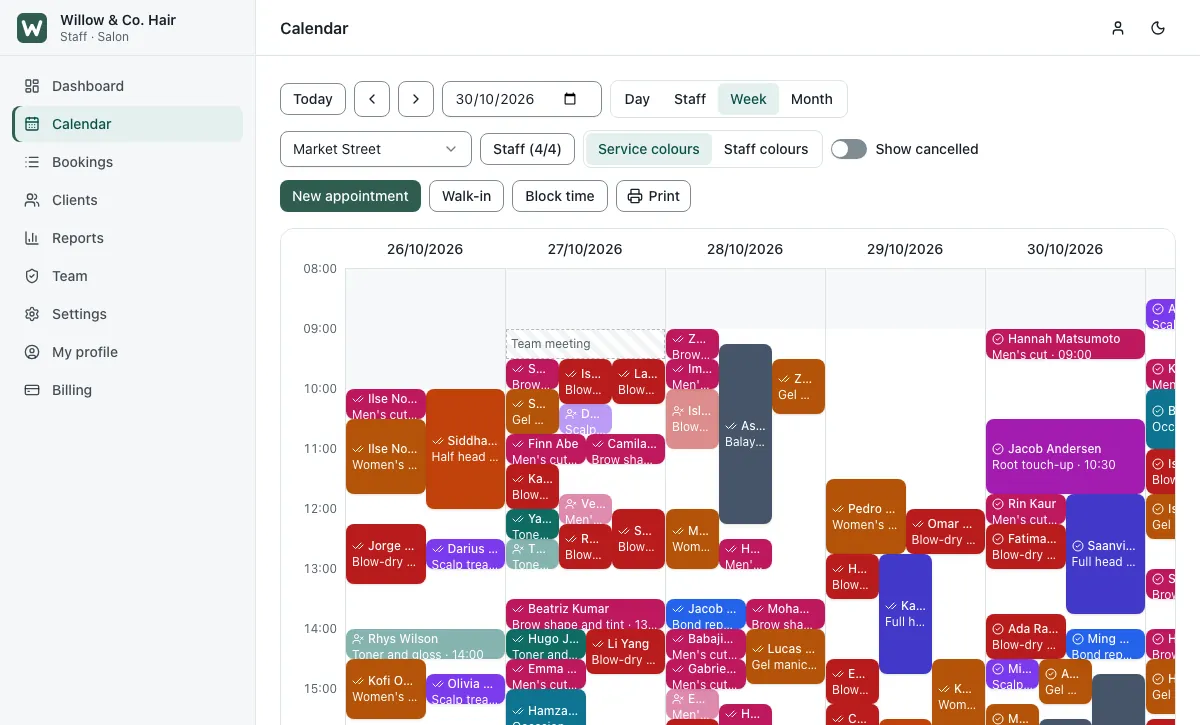
NextBooking is online appointment booking software for businesses that sell time. Customers book and pay on a mobile-friendly booking page, day or night. Staff run the day from a live calendar. Owners see bookings, revenue and no-shows in clear reports. And because it is multi-tenant, one NextBooking platform can serve many businesses at once, each with its own booking page, team, clients and branding, kept fully apart from the others.
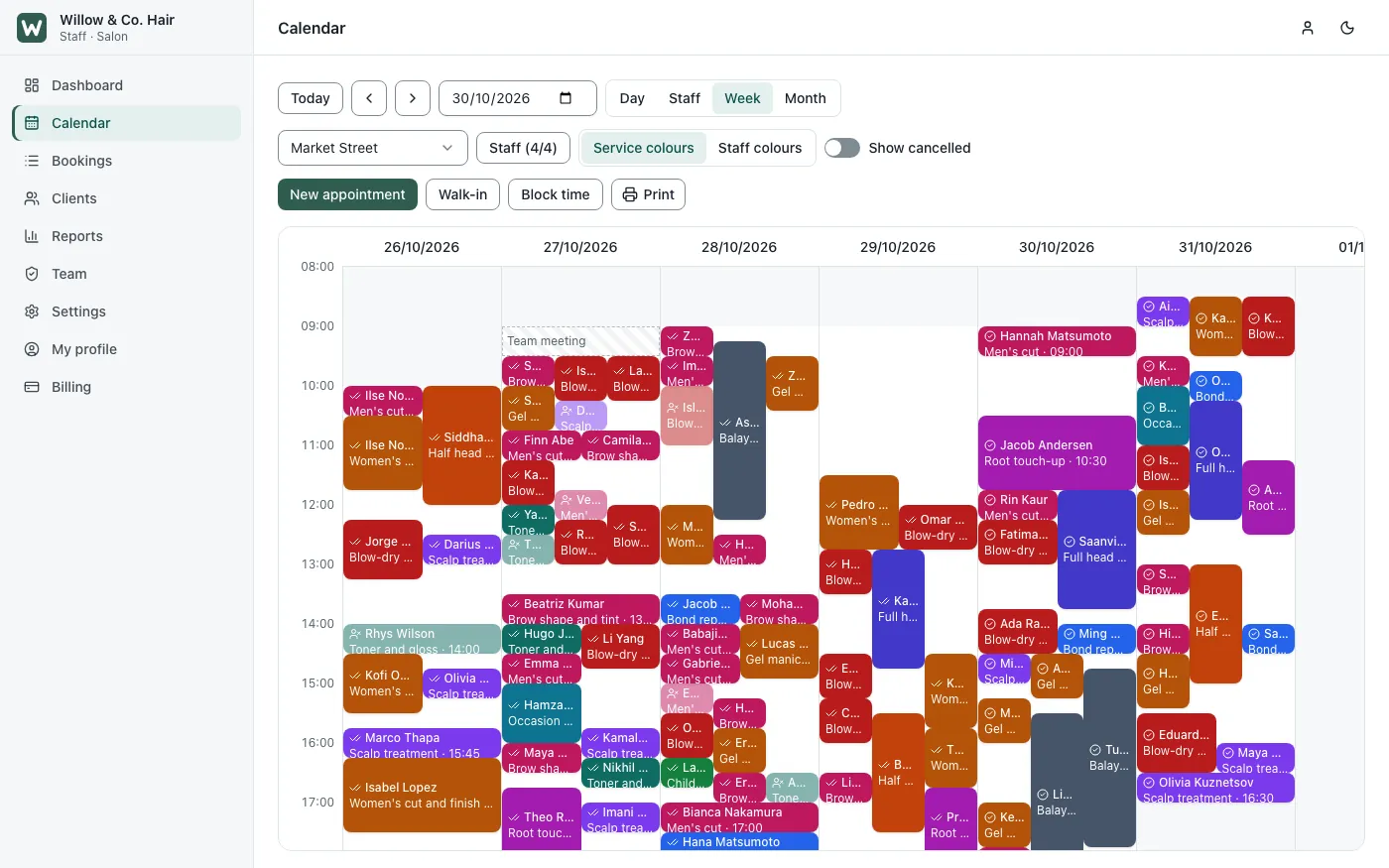
What NextBooking Does
NextBooking replaces the phone calls, paper diaries and missed messages that most appointment businesses still run on. It has three parts, each for a different person:
- The booking page, for customers: they pick a location, services, a staff member and a time, then pay or leave a deposit. No account or password needed.
- The business app, for owners and staff: the calendar, bookings, clients, payments, messages, reports and settings for one business.
- The platform admin, for the platform owner: every business on the platform, their plans and billing, branding, email and SMS settings, backups and updates.
Who NextBooking Is For
- Hair and beauty salons, barbers and spas: several services in one visit, each with its own staff member, price and duration.
- Clinics and therapists: appointment types, buffers between patients, client notes and visit history.
- Coaches, consultants and tutors: online sessions get a Zoom or Google Meet link automatically, and customers see times in their own time zone.
- Businesses with more than one location: each location has its own staff, opening hours and services.
- Franchises and platform owners: run booking for many businesses from one install, with plans, billing and your own branding.
Why it matters to these businesses:
- Bookings around the clock: customers book when it suits them, instead of waiting to call during opening hours.
- Fewer no-shows: deposits at booking, plus automatic reminders by email and SMS.
- No double bookings: the chosen time is held while the customer books, so two people never get the same slot.
- Less admin: customers move or cancel their own bookings within your rules, and the calendar updates itself.
- Your data, your platform: NextBooking runs on your own server, so client data stays under your control.
NextBooking Features
Online Booking Page
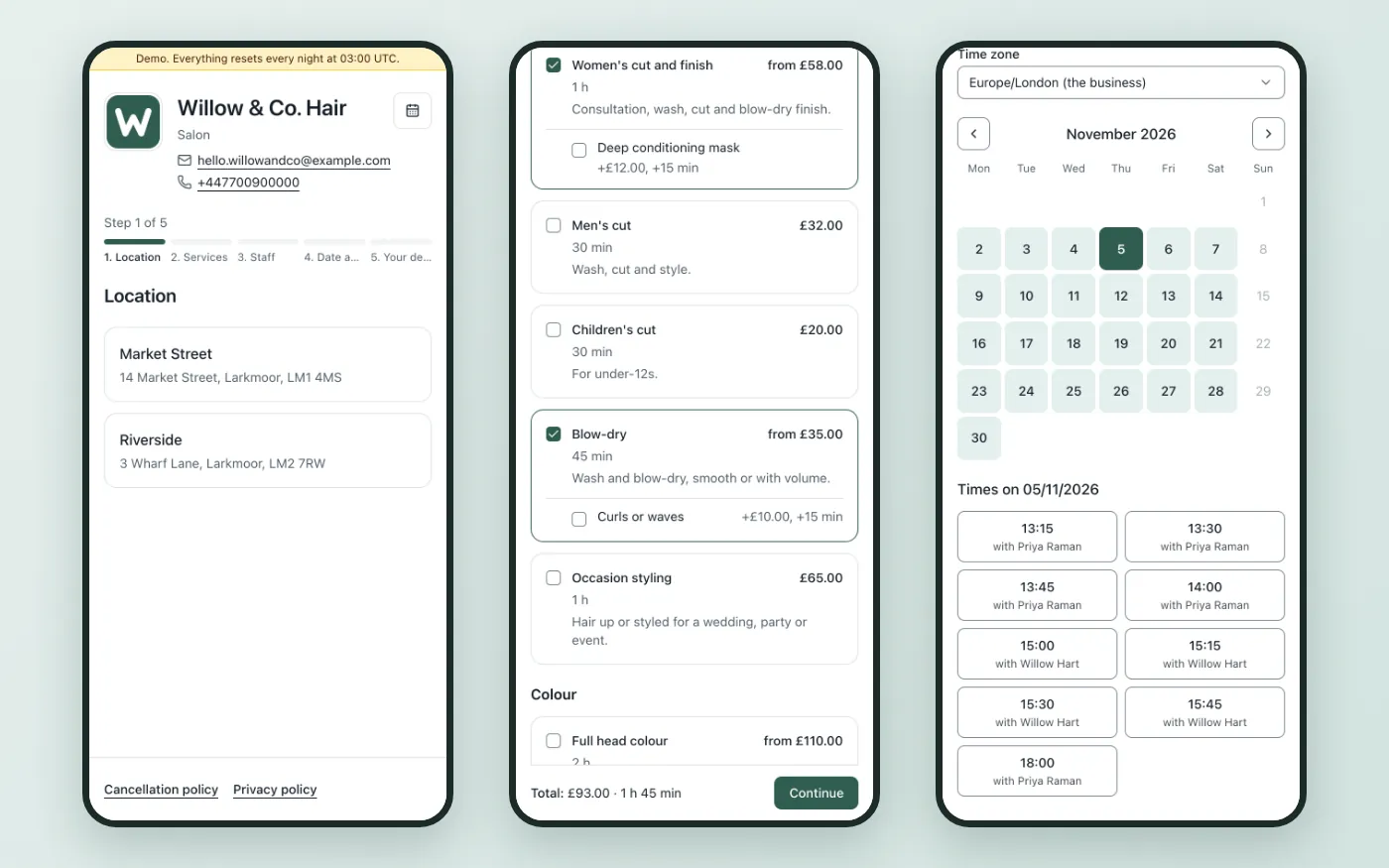
- Five short steps: location, services, staff, date and time, then the customer's details
- Works on any phone, with dark mode and full keyboard use
- Several services in one visit, with add-ons, prices and durations added up as the customer goes
- The chosen time is held for 10 minutes while the customer finishes booking
- Times shown in the business's time zone or the customer's own
- Customers change, move or cancel from a secure link sent by email, within the business's cut-off rules
- Every confirmation offers a calendar file, an add-to-Google-Calendar link and, for in-person visits, directions
- Each business gets its own booking page address and branding
Staff Calendar and Scheduling
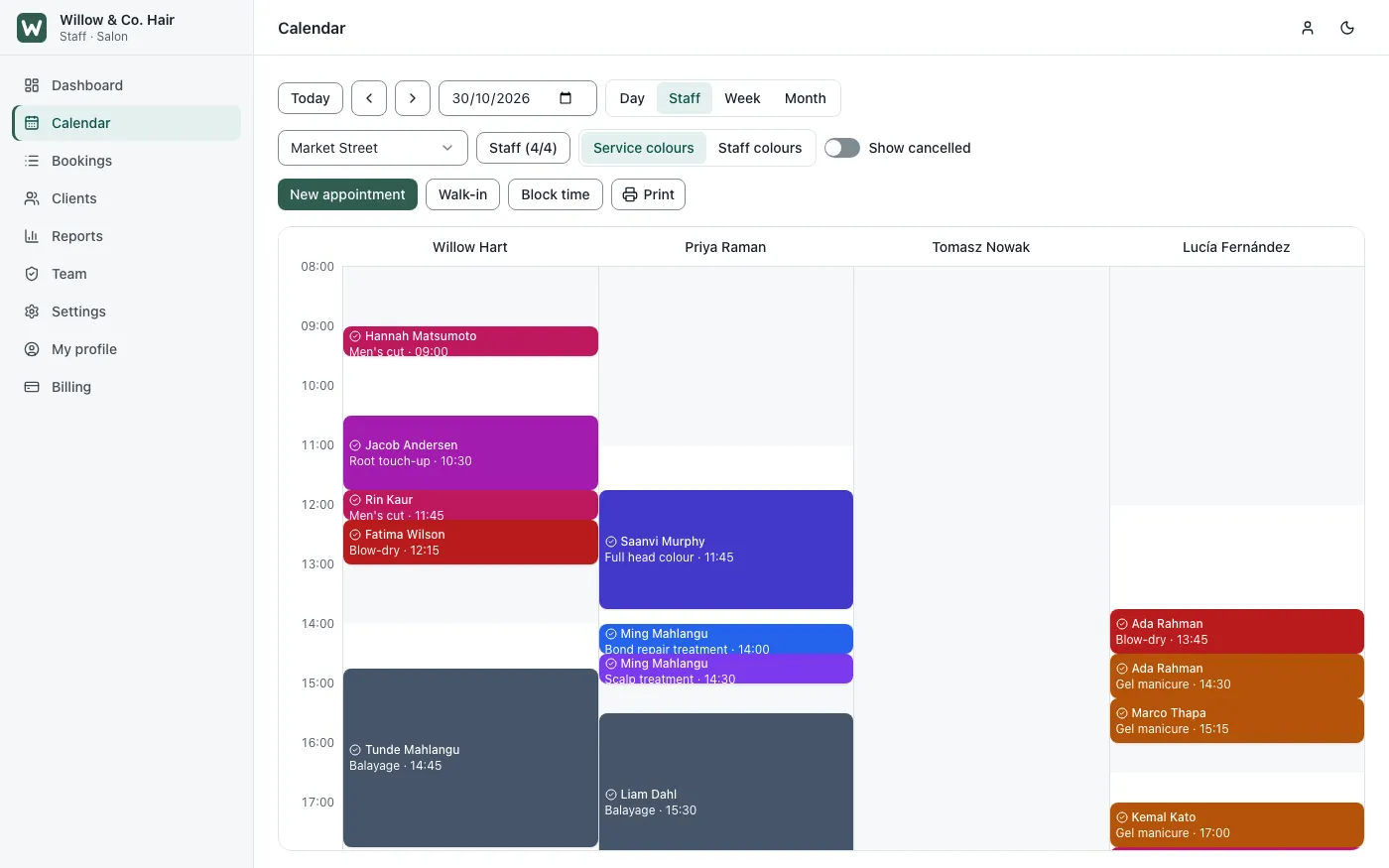
- Day, staff, week and month views that update live, with no page reload
- Drag an appointment to a new time, add a walk-in, block out time or print the day
- Staff schedules, breaks, time off and buffers between appointments
- Services set per location and per staff member
- Booking status: arrived, in progress, completed or no-show, with notes and history on each booking
- Two-way Google Calendar sync for staff
Payments and No-Show Protection
- Card payments or a deposit at booking, through Stripe
- Refunds and full payment history on every booking
- Cut-off rules for changes and cancellations, set by each business
Reminders and Messages
- Email and SMS confirmations, reminders and follow-ups, sent automatically
- A daily agenda email for staff
- Message templates and branding set by each business
- One-click opt-out for customers
- Zoom or Google Meet links added to online bookings once the business connects a provider
Clients and Team
- Client records with visit count, spend, no-shows and notes
- Client import and export, and data deletion on request
- Owner, manager and staff roles, each with its own permissions
- Two-factor sign-in
- Outgoing webhooks to connect other tools
Reports
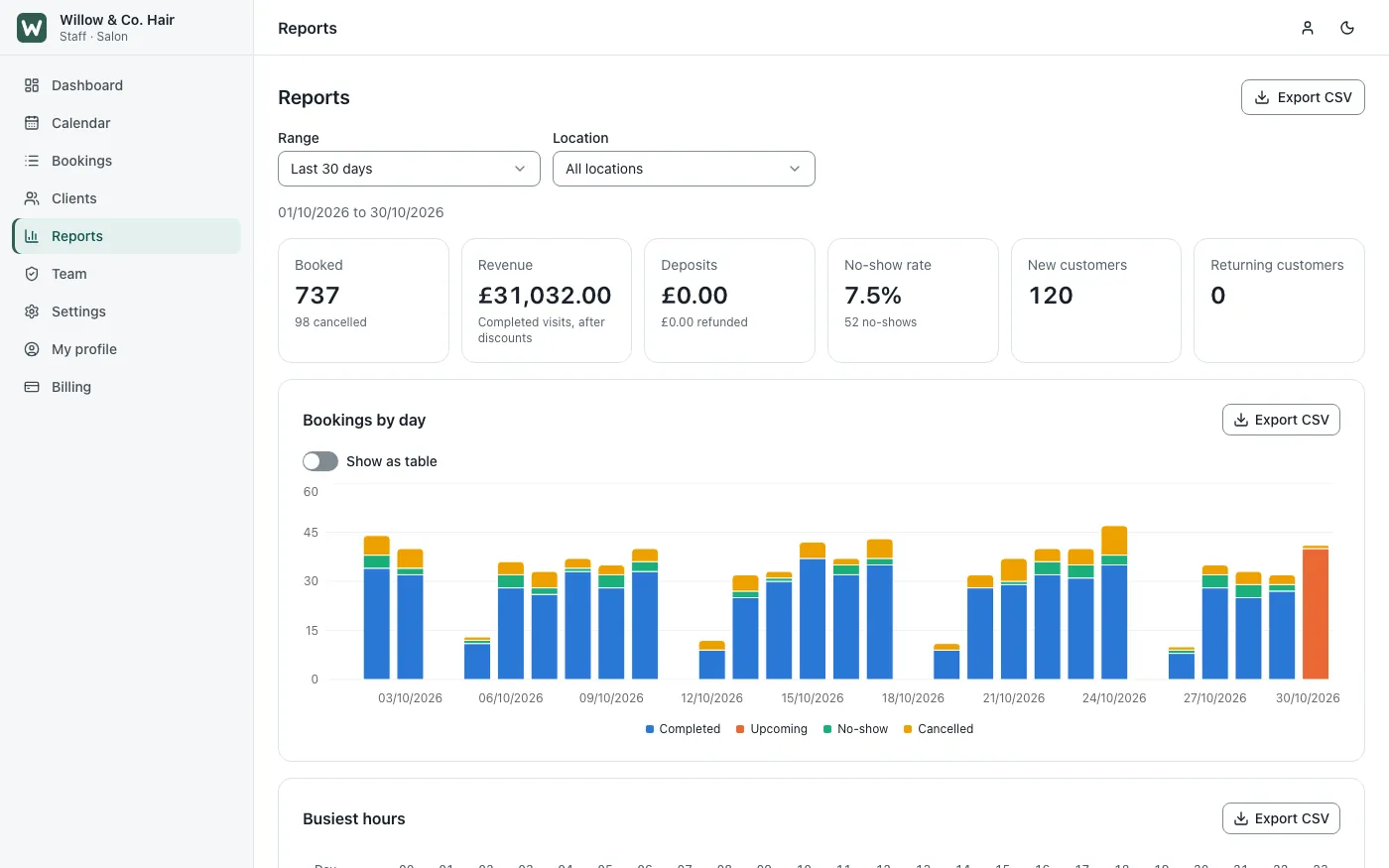
- Bookings, revenue and no-shows over any period
- Busiest hours and weekdays
- Results per staff member, service and location
- Every report downloads as a CSV file for the accountant
Platform Administration
- Add and manage businesses, with plans and plan limits
- Coupons, invoices and subscription billing
- Platform branding, plus email and SMS settings
- File storage on the server or in Amazon S3
- Backups and restore, one-click updates and a system health overview
- A guided first-boot setup in the browser: admin account, branding, email provider and file storage
Security and Data Separation
On a multi-tenant platform, one business must never see another's clients or bookings. NextBooking enforces this twice. The application checks which business every request belongs to. Underneath that, every business's tables are protected by PostgreSQL row-level security, a second wall inside the database itself. A bug in the application layer alone cannot show one business another's data. We compare this with the other common approaches in multi-tenant SaaS architecture choices.
The Technology Behind NextBooking, and Why We Chose It
| Layer | Technology | Why we chose it |
|---|---|---|
| Web app | Next.js and React, with shadcn/ui and Tailwind CSS | Fast pages that work on any phone, and one consistent design across every screen |
| API | Hono on Node.js (REST and tRPC) | Light and fast for the many small requests a live calendar makes, in the same language as the web app |
| Background jobs | BullMQ workers with Redis | Reminders, messages and calendar sync run on time without slowing down the app |
| Database | PostgreSQL with Drizzle ORM | Dependable data, with row-level security to keep each business apart |
| Cache and slot holds | Redis | Holds a chosen time instantly, so two customers never book the same slot |
| Hosting | Docker Compose with Caddy | One install on any server, with HTTPS set up automatically; it can also sit behind nginx |
It is the same pairing we recommend on most Node.js projects: one language from the browser to the database, and a fast, light API. What it costs to own a custom platform like this over time is in what a custom Node.js platform really costs.
Frequently asked questions
What is NextBooking?
NextBooking is online appointment booking software. Customers book and pay on a booking page, staff work from a live calendar, and owners see reports. One platform can serve many businesses, each kept separate.
Who can use NextBooking?
Any business that sells time: salons, barbers, spas, clinics, therapists, coaches, consultants and tutors, including businesses with several locations. Franchises and platform owners can run booking for many businesses from one install.
Can customers pay a deposit when they book?
Yes. NextBooking takes card payments or deposits at booking through Stripe, with refunds and payment history on every booking. Deposits and automatic reminders help cut no-shows.
Does NextBooking send appointment reminders?
Yes. It sends confirmations, reminders and follow-ups by email and SMS, using each business's own templates and branding, and staff get a daily agenda. Customers can opt out with one click.
What technology is NextBooking built with?
Next.js and React for the web app, Hono on Node.js for the API, PostgreSQL with row-level security for data, Redis and BullMQ for slot holds and background jobs, and Docker for hosting.
Planning a Booking Platform or SaaS of Your Own?
The hard parts of a SaaS are rarely the screens. They are keeping many customers apart, billing, booking rules and keeping the platform easy to run. We solved them for booking in NextBooking, as we did for hotels in our Hotelogix case study. Our full-stack development team can take your platform from first sketch to running service. Tell us what you want to build and we will give you an honest view within one business day.